

Is It Your Furnace or Just the Thermostat?
Are you staring at an "offline" message on your wall screen while the house slowly gets colder? Knowing exactly what to check when your smart thermostat loses connection to the furnace can save you from unnecessary panic during the first chilly nights of the September pre-heating season. When nighttime temperatures suddenly drop across Michigan, waking up to a completely silent heating unit is incredibly stressful. However, in our years of servicing Kalamazoo heating systems at Adams Heating & Cooling, we've found that a blank or disconnected screen does not automatically mean your heating equipment has failed completely. Because your entire setup relies on seamless digital and electrical communication to trigger the heating cycle, a simple network drop or a minor power interruption can mimic a total system breakdown.
Before you assume the worst about your HVAC system, running through a few safe diagnostic checks can help you determine if you just need a quick reset or if it is time to call our team for professional heating services.
Many homeowners immediately suspect a cracked heat exchanger or a dead blower motor when the heat won't turn on. In reality, a pattern we see often is that the issue lies in the connection between the wall control and the unit in your basement or utility closet. By understanding how these two devices talk to each other, you can safely troubleshoot the connection without touching any dangerous internal wiring.
How Your Smart Thermostat Communicates with the Heating Equipment
To understand why your system went offline, it helps to know how the connection actually works. Older, manual thermostats were essentially simple switches that clicked on and off. Modern smart devices are tiny computers mounted to your wall. They require continuous power and a stable network connection to function properly in many Kalamazoo area homes.
The Role of the C-Wire in Continuous Power
Smart thermostats draw continuous 24-volt power from the furnace itself. This power travels through a specific low-voltage wire called the C-wire (or common wire). The C-wire acts as the electrical lifeline for your smart device. It keeps the Wi-Fi chip running, the screen illuminated, and the internal sensors active.
Because the thermostat gets its power directly from the heating unit, any power interruption at the furnace immediately kills power to the thermostat. If the furnace loses power, the thermostat goes dark. Our technicians frequently explain to customers that power interruptions here mimic a total system failure, which is why a blank screen usually points to a power delivery issue rather than a broken wall unit.
Wi-Fi vs. Hardwired Connections
Smart thermostats rely on a dual-connection nature. They must talk to the furnace via physical, low-voltage wiring inside your walls, and they must talk to your smartphone app via your home Wi-Fi network. Distinguishing between a dropped local network connection and a dropped physical electrical connection is the first step in diagnosing the problem.
• Screen is on, but app says "Offline" — Likely Connection Issue: Wi-Fi Network Drop — What It Means: The device has physical power but cannot reach your internet router.
• Screen is completely blank/dark — Likely Connection Issue: Physical Power Loss — What It Means: The unit is not receiving 24V power from the furnace C-wire.
• Screen is on, app is connected, no heat — Likely Connection Issue: Communication/Equipment Failure — What It Means: The signal is sending, but the furnace is failing to ignite or respond.
Verifying Your Home Wi-Fi and Router Connection
If your screen is lit up but your phone app cannot reach the device, you are likely dealing with a network issue. Router updates, brief power blips, or changing your internet service provider can kick smart devices off the local network. Walking through a basic network check is the safest, most common external diagnostic step we recommend taking during the September pre-heating season.
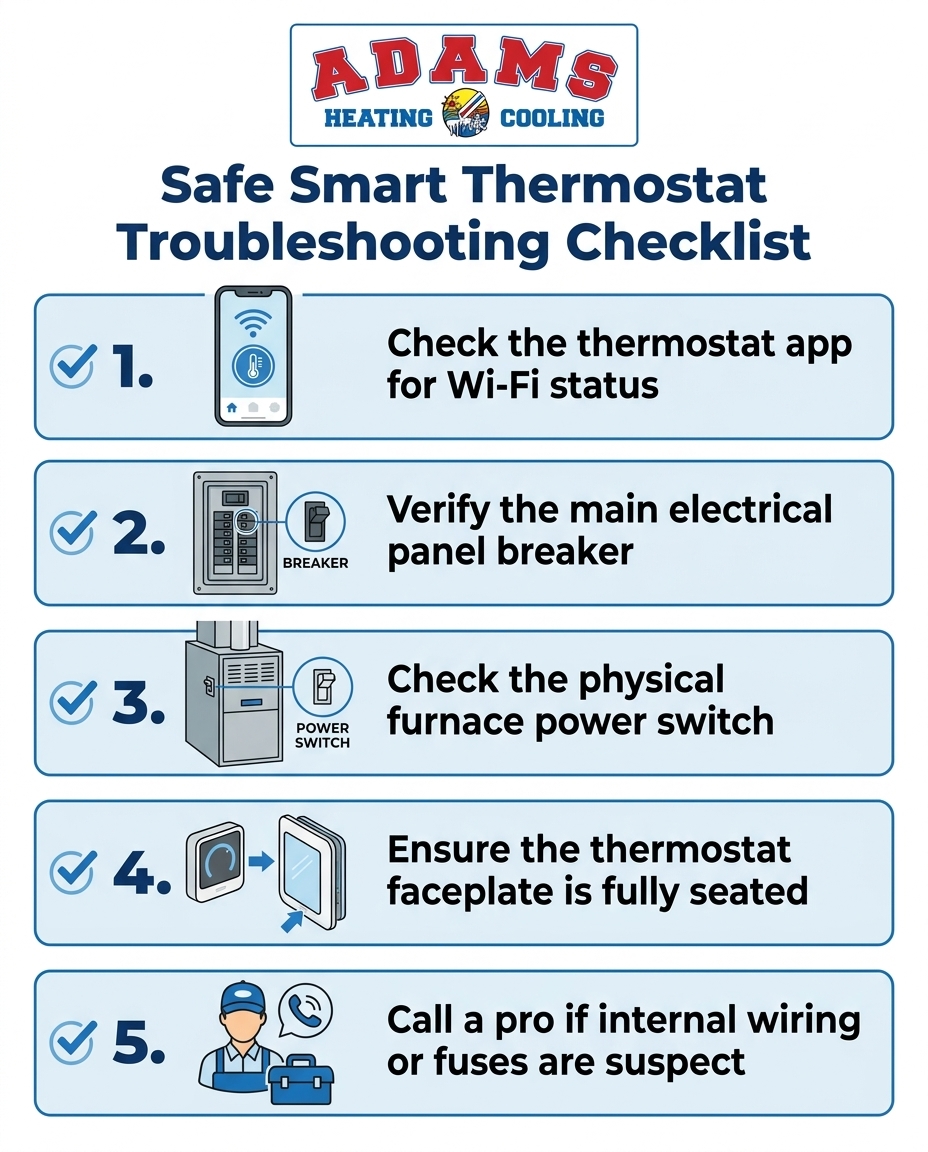
1. Check the physical device screen: Walk up to the wall unit. If the screen wakes up and displays the current room temperature, the device has power. The issue is strictly related to your internet connection.
2. Verify your router's 2.4GHz band: Most smart home devices, including advanced thermostats, require a 2.4GHz Wi-Fi network to connect. While 5GHz networks are faster for streaming video, 2.4GHz signals travel further through walls. If your router recently updated and combined these bands, your thermostat might be struggling to connect.
3. Restart your router: Unplug your home internet router for 30 seconds, then plug it back in. Wait five minutes for the network to fully reboot and check your thermostat app again.
4. Reconnect via the app: Open your specific manufacturer's application and navigate to the network settings. Follow the prompts to re-enter your Wi-Fi password.
Often, resolving erratic Wi-Fi signaling is the hidden key to fixing unexpected temperature fluctuations in your home, as the device needs a steady connection to download weather updates and run its smart algorithms.
Checking the Furnace Breaker and Power Supply
If your thermostat screen is completely blank and unresponsive to touch, the device has likely lost physical power. Because the heating equipment powers the wall unit, a tripped breaker at the main panel will result in a blank screen. Checking your power supply is a quick, cost-saving step that avoids an unnecessary service visit.
The main electrical panel: Locate your home's main electrical panel. Look for the breaker labeled "Furnace" or "HVAC." Even if the switch appears to be in the "On" position, it might be internally tripped. Firmly push the switch all the way to the "Off" position, wait a few seconds, and push it back to the "On" position. Check your wall unit to see if the screen powers back up.
The physical furnace switch: Next, walk to the heating unit itself. Most Kalamazoo area homes have a physical power switch mounted on or near the side of the unit. It looks exactly like a standard light switch. This is the service switch used by technicians to cut power during maintenance. Our team regularly responds to "no heat" calls where this switch simply got accidentally bumped to the "Off" position by someone moving boxes or storing items nearby. Flip it back on and wait to see if the system boots up.
At Adams Heating & Cooling, we believe in honest diagnostics. We actively empower homeowners to check these simple power switches themselves before paying for a professional visit. If a flipped switch solves the problem, you save money and get your heat back immediately.
Inspecting the Thermostat Faceplate and Batteries
If the breakers are on and the furnace switch is engaged, the next safe step is checking the physical wall unit. You can do this without touching any internal wall wiring. A loose faceplate can sever the connection between the smart interface and the metal wall pins, causing the unit to drop offline.
1. Press the faceplate firmly: Gently but firmly push the thermostat faceplate straight back into the wall bracket. Sometimes, dusting or heavy foot traffic can cause the device to unseat slightly. If you hear a click and the screen lights up, the connection was just loose.
2. Check for backup batteries: Even hardwired smart units sometimes rely on lithium backup batteries to save settings during power outages. If these batteries die, the device might act erratically. Remove the faceplate carefully and check the back for a battery compartment.
3. Replace seasonal batteries: If your unit uses AA or AAA lithium batteries, the September pre-heating season is the perfect time to replace them. Always use high-quality lithium batteries, as standard alkaline batteries can drain quickly in smart devices.
4. Do not pull wires: When checking the faceplate, never pull on the exposed low-voltage wires or attempt to re-strip connections. If the wires look damaged, stop immediately.
When to Stop Troubleshooting and Call a Professional
While checking Wi-Fi settings and breaker panels is perfectly safe, there is a strict boundary homeowners must observe. You should never open the furnace cabinet to check internal fuses, the 24V transformer, or the control board. If you have verified the external power switches and the network connection, but the system remains unresponsive, it is time to call a licensed technician.
Warning signs of deeper issues: If you notice a burning smell near the unit, hear a buzzing sound from the electrical panel, or if the breaker trips repeatedly after you reset it, leave the system off. These are clear signs of a short circuit or a failing component. A blown 3-amp fuse on the internal control board will instantly kill power to the thermostat, but as we frequently warn our customers, replacing that fuse without diagnosing the underlying short circuit will just cause the new fuse to blow immediately.
Licensed technicians have the multimeters and specialized training required to test low-voltage wiring safely. We trace the voltage drop from the control board to the wall plate to find the exact point of failure in Kalamazoo area homes.
Proper diagnostics resolve root causes quickly when your equipment fails in a tough spot. For instance, one local homeowner reached out to us last spring when their hot water heater failed shortly after a temporary fix. Our technician offered a thorough diagnostic opinion and repair estimates, then replaced the unit as scheduled while crediting the initial fix cost. We apply that exact same diagnostic rigor to heating communication errors. We find the real problem so you aren't left in the cold again next week.
Preventing Connection Drops Before Cold Weather Hits
Transitioning from reactive troubleshooting to proactive seasonal preparation is the best way to ensure reliable comfort. Early fall is the ideal time to test your heating sequence, long before the freezing temperatures arrive. We always advise our clients not to wait until the first snowstorm to find out their smart device cannot talk to the blower motor.
The impact of dormant systems: Over the summer, dust buildup on sensors, loose wire nuts from minor house vibrations, or a slowly degrading 24V transformer can compromise your system. When you attempt that first start-up during the September pre-heating season, these minor issues suddenly present as a complete communication failure.
To avoid this, we highly recommend securing a routine maintenance plan. During a professional tune-up, our technicians will test the voltage output of your C-wire, tighten all electrical connections, and verify that the thermostat is sending the correct signals to the control board. Catching a failing transformer or loose wiring in the fall prevents a stressful mid-winter breakdown when Kalamazoo winters are at their worst.
Frequently Asked Questions About Thermostat and Furnace Connectivity
Why is my thermostat not communicating with my furnace?
This is usually caused by a tripped furnace breaker, a disconnected C-wire, a blown internal furnace fuse, or a dropped Wi-Fi signal. If the screen is completely blank, the device has lost physical power from the heating unit. If the screen is on but the heat won't engage, there may be a break in the low-voltage communication wire or a failure at the main control board. Always check your main electrical panel first.
What causes a smart thermostat to go offline?
Power loss from the HVAC system, router reboots, changed Wi-Fi passwords, or dead backup batteries are the most common culprits. Smart devices rely on your home internet to communicate with your phone app. If your router updates or experiences a brief power surge, it can temporarily kick the device off the network. Reconnecting via the manufacturer's app usually resolves this.
Does a smart thermostat need a C-wire for a furnace?
Yes, most models require a C-wire to provide continuous 24V power. Because smart devices have illuminated screens and Wi-Fi chips, they draw more power than older, battery-operated units. While some modern units use power-extender adapters if a C-wire isn't present in the wall, our installers have found that having a dedicated common wire is the most reliable way to prevent power drops in Kalamazoo area homes.
How do I reconnect my smart thermostat to my furnace?
Verify the furnace has power, ensure the faceplate is seated, and use the manufacturer's app to update network settings. Start by checking the physical switch near the heating unit and the main breaker panel. Once you confirm the unit has physical power, gently press the wall unit to ensure the pins are connected, then follow the Wi-Fi setup prompts on your smartphone.
Can a blown furnace fuse cause a blank thermostat?
Yes. If the 3-amp or 5-amp fuse on the furnace control board blows, it cuts 24V power to the thermostat immediately. This safety feature protects the expensive control board from electrical shorts. If this fuse blows, a homeowner should never attempt to bypass it or replace it without having a professional diagnose the short circuit that caused the failure in the first place.
Get Your Heating System Ready for the Fall
If you have verified your Wi-Fi network, checked the main breakers, and ensured the faceplate is securely attached, but your smart thermostat still cannot connect to your furnace, the issue requires professional attention. Do not risk your safety by opening the unit's cabinet to inspect internal wiring. Instead, take action during the September pre-heating season to get the root cause diagnosed safely. Reach out to Adams Heating & Cooling to schedule a thorough inspection, and let our experts restore reliable communication to your system before the deep freeze arrives.
Customer Testimonials

In the past 18 months, Adams has installed a new Amana air conditioning system, and new filtration and humidification systems at my home. The installers were all very courteous, professional and knowledgeable. Their work was simply superb... reasonably priced, and performed on time and to perfection! I enthusiastically recommend Adams, without reservation!
As usual, Adams Heating and Cooling exceeded our expectations. The quote was done in a timely manner, pricing was fair, installation was quick and the job was done right! Rob is great to work with. Adams is first on our list!
Called these guys off of a referral from a friend. Home furnace failure in sub-zero temperatures, late at night. Dan was there in an hour. Friendly, polite, professional and most importantly, very competent. Diagnosed and fixed the problem in under an hour. After hours 24/7 pricing was surprisingly reasonable. This outfit gets straight A+ from us.
Excellent service! We had them replace our heater, AC, and water heater as a package deal. They even helped with financing as it was a large expense to address at one time. It left us with peace of mind that all the mechanicals in our home were new!
They have always been there for us and did so again by responding quickly to put in a new furnace after a lighting strike caused a power surge. In addition, their electrician came by to help with other issues caused by the strike. Everyone we work with from the who answers the phone to who shows up to complete the work are polite, pleasant and professional! And quick to respond and on time!
From the service call to the installation with Dan, Dave, and Daniel… our experience was top notch. They quickly came out, identified the problem, and installation of our new unit took less than 3 hours. Can’t recommend Adams enough!
Dan, Dave and Mike were phenomenal! Very patient, listened to my questions/concerns, and made sure that everything was working and that my Nest was working correctly, before leaving. Thank you so much for your service!
Service was excellent! Had a new furnace installed. The technicians did a wonderful job and completed the installation quickly. Mike answered my questions and followed up to verify the worke done. I was charged just as I was quoted. Have used Adam's for repairs in the past and I'm always pleased. Great work!
I had a boiler and water heater replacement/upgrade. I went from an 84% efficient boiler to a 95% efficient. I dont recall the water heater's efficiency. That was upgraded to an indirect water heater. Josh and Brad did a great job. The work looks great. The boiler and water heater work as to be expected. Their customer service is excellent. I will definitely be calling then when my basement remodel is ready to start.
I have had Adam's Heating and Cooling out at my house before, so I called them for some gas line work. The estimator was very helpful and let me know the best way to be ready for when the work is scheduled so they can test the generator after they install the gas line to the meter and also let me know how to take care of another issue I had that would be helpful. I look forward to getting this work done and working with them.

Financing
Flexible financing options are available to help you get the comfort you need without the upfront financial stress.